QESCO Online Bill
Use our WAPDA QESCO Online Bill Checker to instantly access your electricity bill. Simply enter your 14-digit reference number or 10-digit consumer ID to view your bill amount and due date. You can also view the complete bill, download it, or print a copy for payment. No registration is required—just enter your details and check your QESCO bill anytime, easily.
QESCO Online Bill Checker
Select an option and enter the required number:
Steps To Use QESCO Online Bill Checker
Now you can check your QESCO (Quetta Electric Supply Company) electricity bill from your home. Just follow these simple steps to access your bill quickly and without any issue.
Step 1: Select An Option
There are two simple options to check your bill. The first is the Reference Number — a 14-digit number that is linked to your electricity connection. The second is the Consumer ID — a 10-digit number given to your account. You can use whichever one is easier for you.
Step 2: Enter The Required Number
After choosing the option you like, type the number in the box. If you picked the Reference Number, enter all 14 digits without spaces. If you chose the Consumer ID, type the 10-digit number. Make sure you enter the number correctly so you can see your bill without any problem.
Step 3: Click The “View Bill” Button
After you enter the number, click the “View Bill” button. The system will check your details and show your latest electricity bill.
Step 4: View Your Bill
Your QESCO electricity bill will open in a new tab. It will show important details like:
- Billing period
- Total amount due
- Due date
- Meter reading details
- Payment history

Step 5: Download or Print Your Bill
When your bill shows on the screen, you can download it as a PDF to keep it safe. You can also print a copy if you need it for payment or to keep for later.
If you lost your bill, don’t worry — you can check it again and download a duplicate copy easily.
About QESCO
Quetta Electric Supply Company (QESCO) provides and maintains electricity in Balochistan, Pakistan. It works under WAPDA (Water and Power Development Authority) and supplies electricity to millions of people in Quetta and many other areas of Balochistan.

QESCO Subdivisions
| Gawalmandi | Loralai | Kharan |
| Satellite Town | Kohlu | Dalbandin |
| Liaquat Bazar | Duki | Baseema |
| Mehar Dar | Harnai | Khuzdar I |
| Quetta Cantt | Ziarat | Khuzdar II |
| Mariabad | Musa Khel | Sorab |
| Kutchlak | Muslim Bagh | Sibi |
| Katchery | Zhob | Lehri |
| Alam Khan | Qilla Saifullah | Sui |
| Sariab | Mastung | Dhader |
| Kirani | Kalat | D.M. Jamali |
| Sheikh Manda | Khaliq Abad | Usta Muhammad |
| Spezant | Kanak | Jaffar Abad |
| Browery | Noshki | Sohbat Pur |
| Pishin | Yart | Khanozai |
| Alizai | Qilla Abdullah | Chaman I |
| Turbat | Panjgur | Chaman II |
| Tump | Gawadar Urban | Gawadar Rural |
QESCO Online Bill Payment
Paying your QESCO bill on time is important — and now it’s very easy. QESCO gives you different ways to pay your bill without any trouble. Whether you like using mobile apps or paying the old way, QESCO makes sure the process is safe and simple.
Thanks to new technology, many people now prefer to pay online. QESCO supports popular digital options like JazzCash, Easypaisa, and banking apps, so you can pay your bill from home — quickly and easily.
Paying Through JazzCash
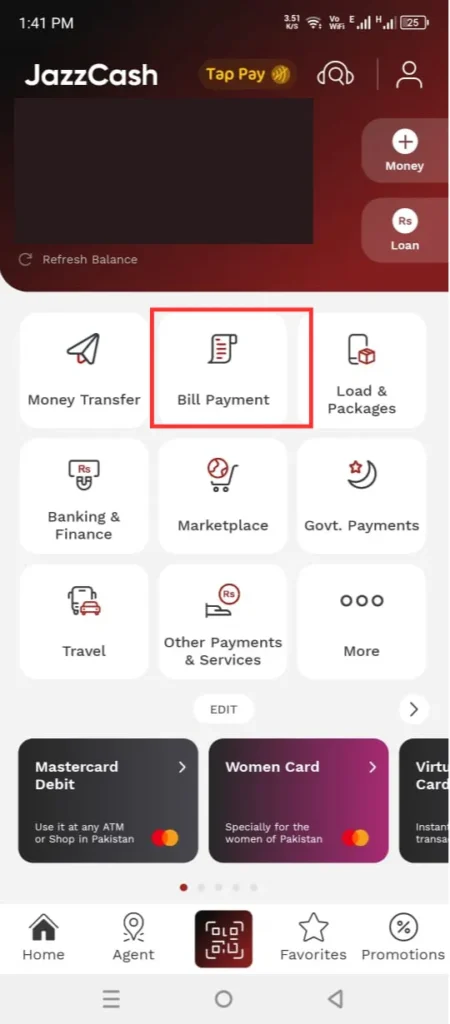
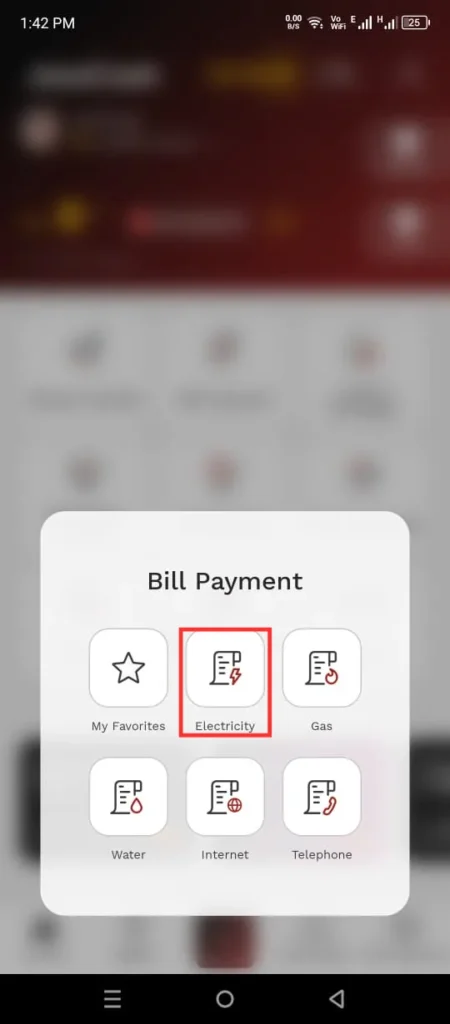
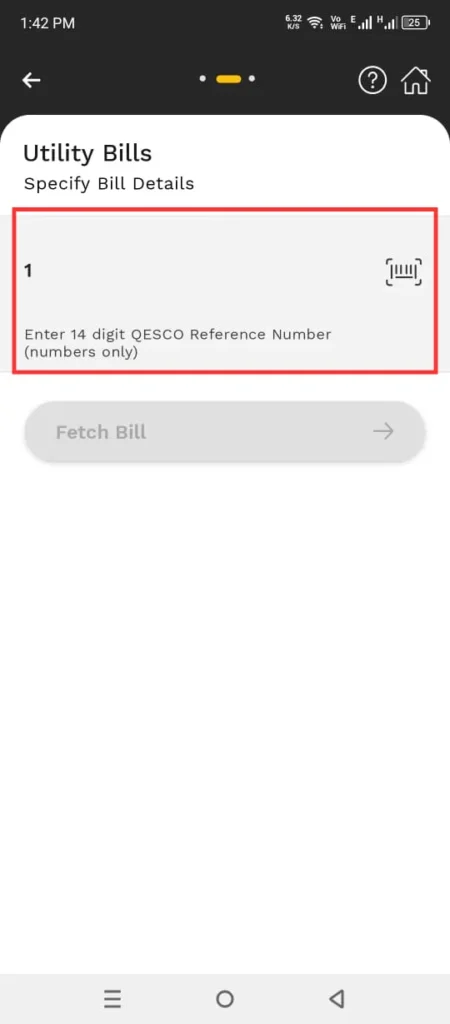
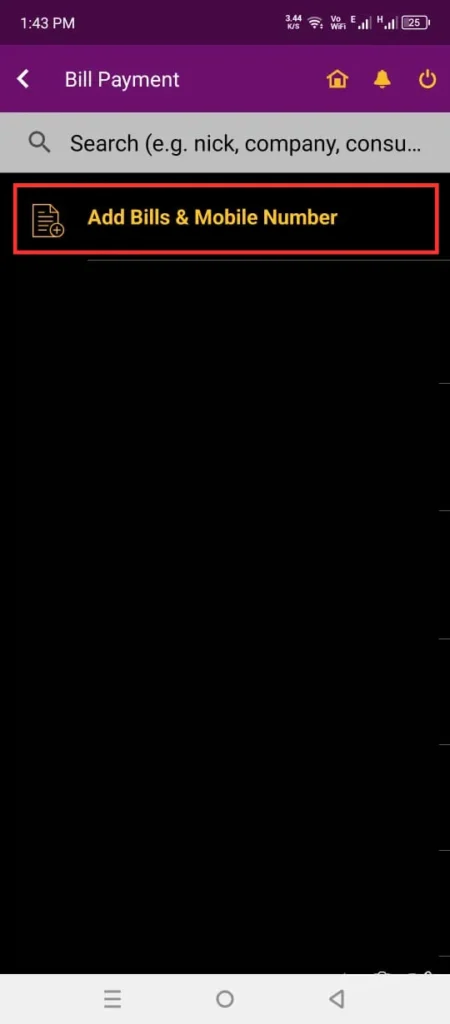
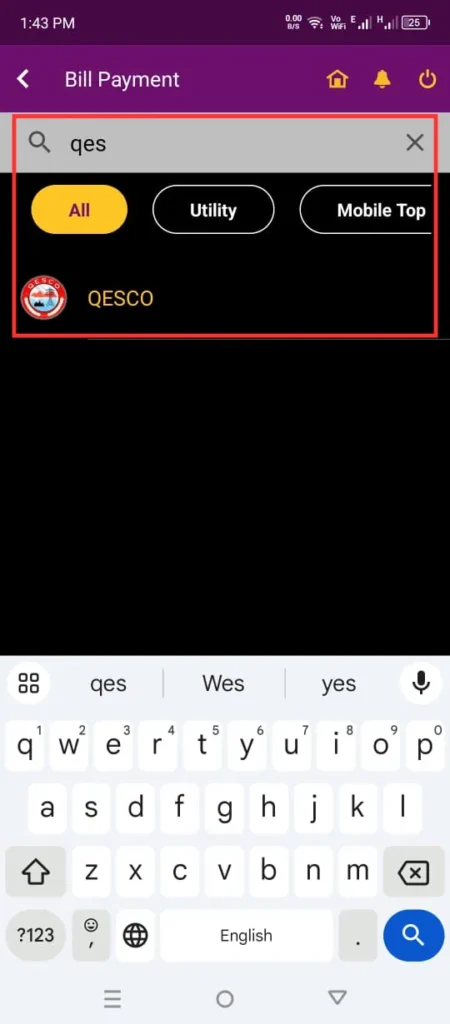
JazzCash makes it easy to pay your QESCO bill using your mobile. Just follow these steps:
- Open the JazzCash app on your phone.
- Tap on the Bill Payment option.
- Choose QESCO from the list.
- Enter your Reference Number.
- Check the bill details and confirm the payment.

Paying Through Easypaisa
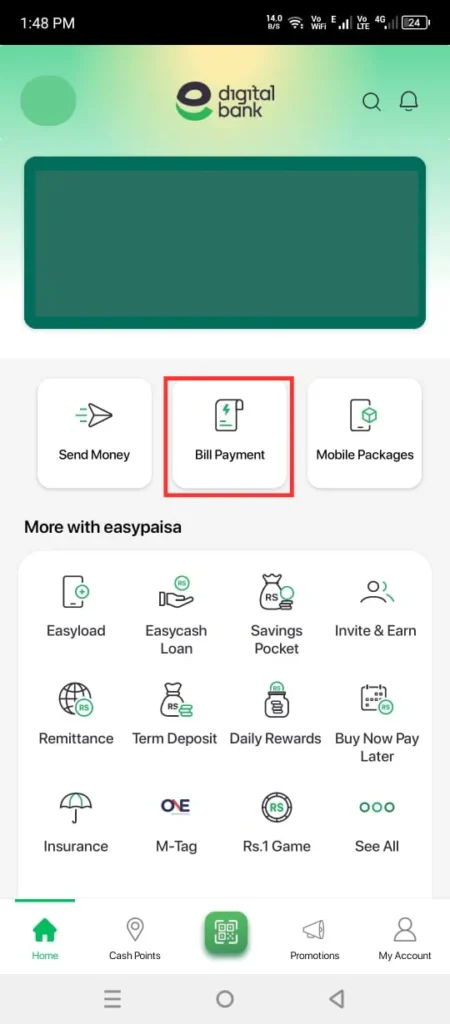
Easypaisa also gives you a quick and safe way to pay your QESCO bill. Just follow these easy steps:
- Open the Easypaisa app on your phone.
- Tap on Bill Payment and select QESCO.
- Enter your Reference Number.
- Check the bill details and tap to make the payment.
- After payment, you’ll get a confirmation message.


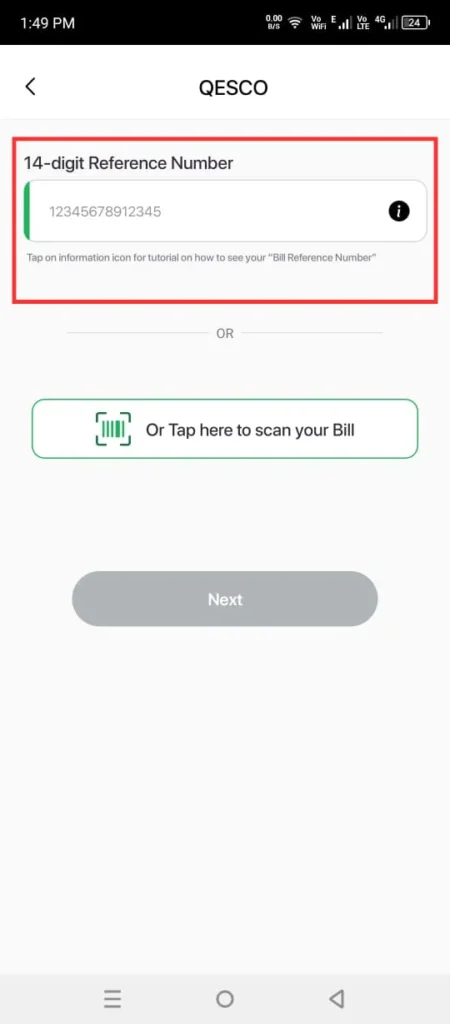
Banking Apps
If you use banking apps like MCB Live, HBL, UBL, Meezan, or any other online banking app, you can easily pay your QESCO bill. Here’s how:
- Log in to your banking app.
- Go to the Bill Payment section.
- Select QESCO from the list.
- Enter your Reference Number and check the details.
- Confirm the payment — and you’re done!


Offline Payment Methods
If you like the old way of paying bills, you can still pay your QESCO bill by hand at:
- Bank branches (like HBL, UBL, MCB, and others)
- Post offices
- Retail shops that are authorised to collect bills
Just take your printed QESCO bill to any nearby location and pay in cash.
Contact Details
If you have any problem with your bill, electricity supply, or any other service, you can get in touch with QESCO Customer Support for help.
- General Helpline & Complaint Number: 081-9201445
- Website: qesco.com.pk
- Head Office Address: Zarghoon Road, Quetta, Pakistan
FAQs
What Should I Do If My QESCO Bill Is Not Showing Online?
Make sure you entered the correct Reference Number or Consumer ID. If the bill still doesn’t show, call the QESCO helpline at 081-9201445 for help.
Can I Download A Duplicate Copy Of My QESCO Bill?
Yes, you can. After checking your bill online, you can download a PDF copy for payment or to keep for your records.
How Can I Calculate My QESCO Bill?
Use the QESCO bill calculator by entering the number of units you used in the month. It will give you an estimate of your bill amount.
What Are The Online Payment Methods For QESCO Bills?
You can pay your QESCO bill using several convenient methods. These include banking apps such as MCB, HBL, UBL, Meezan, and others. You can also use popular mobile wallets like JazzCash, Easypaisa, and UPaisa. Additionally, bills can be paid through ATMs and internet banking, making the process quick and easy from anywhere.
How Can I Apply For A New QESCO Connection?
Download and fill the QESCO new connection form from the official website, and submit it at your nearest QESCO office.
How Can I Change The Name On My QESCO Bill?
Go to the nearest QESCO office and submit a name change application along with:
- A copy of your CNIC
- Proof of property ownership
- Other required documents
What Is Net Metering & Does QESCO Support It?
Net metering lets you use solar panels to generate your own electricity. If you make extra power, it goes back to the grid and reduces your bill.
QESCO supports net metering under NEPRA rules.
To apply, visit your nearest QESCO office with:
- Solar system details
- Installation certificate
- CNIC copies and other required papers